Practical guide
How to Help a Pregnant Friend From Far Away: A Remote Support Plan
Turn a distant offer into an accepted job, recipient-local window, local receiving handoff and honest completion update. Use two fictional examples, four messages and a private blank record.
Offer one useful job, with an easy way to decline
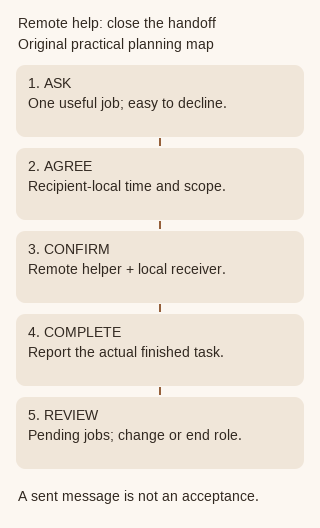
To help a pregnant friend from far away, offer a specific job you can finish, agree when and how they want it, and confirm any local person needed to receive the help. An accepted grocery order with a receiver is useful. “Let me know if you need anything” leaves your friend to invent, organise and supervise the job.
Begin with two modest options: “Would collecting grocery offers or arranging an order you choose help this week? Neither is fine.” You are offering support, not checking how grateful or organised someone is. A person can want a short message but decline calls, visits, purchases or coordinating help.
Distance changes the handoff: you may be able to order or coordinate something without being able to open the door, put groceries away or respond locally when a plan changes. Name that missing step before promising a complete task.
The NHS advice about relationships after having a baby encourages clear requests for wanted help and shared responsibilities. It concerns the postnatal period. The remote pregnancy workflow here is an original planning aid applying clear communication to ordinary tasks; it is not a clinical protocol issued by the NHS.
Choose help that fits your actual availability
On a phone, swipe inside the table. With a keyboard, focus the table and use the arrow keys.
| Offer | What the remote helper can finish | What still needs agreement |
|---|---|---|
| Grocery order | Use the accepted list, budget and chosen delivery option. | Someone accepts the delivery window and puts it away. |
| Offer coordination | Collect only the offers the person wants and report confirmations. | Each named helper actually accepts a job. |
| Appointment-day logistics | Confirm the wanted lift or household cover with the agreed people. | The care service confirms the appointment; the patient controls care decisions. |
| A quiet check-in | Send one wanted message in the agreed window. | No expectation of an immediate reply or a health report. |
Pick a job that still works when you cannot travel or take calls throughout the day. If you can only handle one order, say that. “I can organise this week’s agreed groceries; I cannot be the on-call coordinator” gives the recipient a usable limit.
A purchase needs the person’s chosen items, delivery details and agreement about cost. Do not assume you should spend their money, subscribe them to a service or accept substitutions they have not approved. Check the ordinary delivery terms instead of assuming that an overseas order works like one in your own neighbourhood.
A remote helper does not need a patient portal password, complete medical notes or an appointment result to arrange laundry or groceries. Use only the information needed for the accepted task. Appointment booking, access and representation depend on the actual service and the patient’s authorisation; this worksheet grants no account access or legal authority.
Use the recipient’s local time and agree how updates work
Write the date, time window and time zone for the place receiving help. “Tuesday afternoon” can mean different periods in two countries. A short confirmation such as “Tuesday 10 November, 13:00–14:00 in your local time, UTC+00:00” is easier to check than a time with no date or zone.
Check the conversion for the actual date, especially around daylight-saving changes. A city can have a different UTC offset in another month. The following example uses stated offsets, not a permanent rule for any country: 18:00 at UTC+00:00 equals 13:00 at UTC−05:00 on the same date. Both identify the same moment.
Agree a low-demand update format: task accepted, confirmation still pending, changed, or completed. The recipient can decide whether a daily message, one completion note or messages only when something changes would help. Avoid turning every delivery notification into another question they must answer.
If you need an answer before ordering, state that practical deadline and the smaller plan: “If we have not agreed a receiver by the booking deadline, I will leave the order unbooked.” Silence is not acceptance. It also does not tell you why someone has not replied; do not infer a health conclusion from an unanswered routine message.
Work through a complete handoff, including a failed confirmation
The examples below are fictional. They show task status and communication, not observed family outcomes.
Example A: an agreed grocery delivery. Maya wants a short grocery order. Rowan can arrange it remotely. Maya chooses the items and accepts the cost arrangement. Jo, who lives nearby, accepts the 13:00–14:00 recipient-local window on 10 November 2026 and agrees to receive and put away the groceries.
Rowan’s note says “order booked; receiver confirmed; delivery not yet completed.” After the actual handoff in this fictional example, Jo reports “received and put away.” Only then does the task become completed. A booking email alone would not establish that last step.
Example B: the receiver is unavailable. Jo cancels before booking. Rowan marks the receiving step changed and tells Maya that the order is still unbooked. An agreed alternative may be a different window, another accepted receiver or pausing the delivery.
Rowan does not book it and hope somebody opens the door. Maya does not have to explain private care details to make the original window unavailable. The useful result is an honest pending job and a smaller agreed plan.
For a prepared meal, use the separate food-safety and meal-handoff guide. Confirming a receiver and confirming safe food handling are related but different checks.
Use four short messages that reduce coordination work
Offer: “I can organise one grocery order or collect the help offers you want. Would either be useful? Message-only support or no task is fine.”
Confirm: “I have the agreed list. The receiving window is [date, local time and zone]. [Person] has accepted receiving and putting it away. I will send one completion update.”
Change: “The receiver is unavailable. The task is changed, not confirmed. Would the already-agreed alternative work, or should I leave it unbooked?”
Handover or stop: “My coordinating role ends [date]. These tasks are complete; this one is still pending. [Person] has accepted the next role / nobody has accepted it yet.”
These are original example messages. Adapt the information and tone to your relationship. Do not use an ordinary group chat as a medical record, or share a home access code widely just because several people offered to help.
Review the role, and make the end of it clear
A coordinating role can be useful for a short period without becoming permanent. At an agreed review, ask which task helped, which created extra messages and what should change. A recurring order should not continue automatically if the person no longer wants it.
If another helper takes over, confirm their acceptance and transfer only relevant open tasks, not a whole private conversation. Cancel an unwanted booking through the actual service and check its current cancellation terms. Mark an unresolved job as pending rather than presenting your departure as a completed handover.
Limited help is a real situation, not a failed worksheet. The NHS services and support page describes UK routes such as health visitors, local family services and parent groups. Availability varies. A local enquiry about a specific gap can be useful; this guide does not promise a funded delivery, an in-home helper or universal eligibility.
For an urgent concern, use the appropriate care or emergency route and the person’s actual instructions. A routine remote check-in or your next available time should not become a reason to delay that contact.
Keep a short private record of the accepted job
Use the record for the task and its open handoff. A named helper can receive only their own job. Choose who sees the working copy and revise it when arrangements change; an old screenshot is not necessarily the current plan.
REMOTE PREGNANCY SUPPORT - PRIVATE WORKING NOTE
Recipient’s requested task / what is not wanted:
Helper and accepted scope:
Recipient-local date, time window and time zone:
Local receiver / acceptance / receiving arrangement:
Information actually needed / sharing preference:
Pending, confirmed, changed or completed / next update:
Backup or smaller plan / review or end of role:
Open the blank remote-support record (TXT). Save the text from your browser or copy it into a private note. The website does not receive a completed copy. For a whole household rota after home arrival, use the existing first-days-home help rota; it solves the broader day-by-day planning task.
Check six situations before calling the task complete
These fictional checks test a practical arrangement. They do not assess pregnancy, interpret a lack of response or grant access to personal accounts.
Case 1
A friend offers “any help, anytime.” Can you mark tomorrow’s grocery delivery as confirmed?
Show answer and explanation for case 1
No. Agree the actual job, window and receiving handoff.
The offer is not yet an accepted arrangement. Keep it pending until the people needed for the task have agreed.
Case 2
The plan says 18:00 at UTC+00:00 and 13:00 at UTC−05:00 on the same date. Do those identify the same moment?
Show answer and explanation for case 2
Yes, for those stated offsets and that date.
Adding five hours to the UTC−05:00 local time gives 18:00 UTC. Check the actual date and local zone instead of assuming the offset lasts all year.
Case 3
The grocery order is booked, but nobody has accepted receiving it. Is the complete task confirmed?
Show answer and explanation for case 3
No. The local receiving step is still open.
Booking and receiving are different responsibilities. Change the window, confirm a receiver or leave the order unbooked if that is the agreed alternative.
Case 4
A remote coordinator asks for a portal password to organise laundry cover. Is it needed for that job?
Show answer and explanation for case 4
No. Share the accepted task and relevant logistics instead.
An ordinary household task does not require a patient account. Do not use a coordinating role as permission to obtain or share private clinical records.
Case 5
The recipient has not answered a routine offer. May you book the visit and infer that silence means they want help?
Show answer and explanation for case 5
No. Keep the offer unaccepted and use the agreed fallback.
Silence does not confirm consent or explain the person’s situation. This routine planning example is not a way to assess health or safety.
Case 6
Your coordinating period ends tomorrow, but the replacement has not accepted. Can the record say handover completed?
Show answer and explanation for case 6
No. Mark the next coordinating role pending.
List completed and open tasks, inform the relevant person and agree a smaller plan. A name on a sheet is not a confirmed handover.
Sources and further reading
- Relationships after having a babyUK postnatal communication and wanted-help context. Page last reviewed 20 May 2026. The remote pregnancy workflow, scripts, time example and worksheet are original; no source-issued remote clinical protocol claimed.
- Services and support for parentsUK parent-support routes and variation in local availability. Page last reviewed 27 April 2026; no eligibility, funded delivery or in-home service promised.